Typst: show rules and templates
Set rules change the arguments of an element. Show rules go further: they let you replace how an element looks completely. Together they are how templates work.
Show-set rules
The simplest show rule applies a set rule only to one kind of element.
#show heading: set text(fill: rgb("#1e66f5"))
#show link: set text(fill: blue)
#show raw: set text(font: "DejaVu Sans Mono")

= A blue heading
Visit https://typst.app.

Use where to pick only some of them:
#show heading.where(level: 1): set text(size: 20pt)
#show heading.where(level: 2): set text(style: "italic")

= Big
== Slanted

Show rules with a function
A function receives the element (usually called it) and returns what to show instead. it.body is the text of a heading, and the element's other fields are available too.
#set heading(numbering: "1.")

#show heading.where(level: 1): it => block(width: 100%)[
  #set text(size: 16pt)
  #counter(heading).display()
  #h(0.5em)
  #smallcaps(it.body)
  #v(-0.6em)
  #line(length: 100%, stroke: 0.6pt)
]

= Introduction
= Method

Replacing text
A show rule can also match a word or a regular expression.
#show "TypstDrive": name => text(fill: rgb("#1e66f5"), weight: "bold", name)
#show regex("\d+%"): it => text(fill: green, it)

TypstDrive makes collaboration easy, and 90% of users agree.

The everything rule
#show: function passes the rest of the document to a function. This is the heart of every template.
#let shout(body) = {
  set text(size: 14pt)
  upper(body)
}

#show: shout
Everything below is in capital letters.

Writing a template
A template is a function that takes some details and the document body, sets all the styles, adds a title, and returns the body.
#let article(
  title: none,
  authors: (),
  abstract: none,
  body,
) = {
  set document(title: title, author: authors)
  set page(paper: "a4", margin: 2.5cm, numbering: "1")
  set text(font: "Libertinus Serif", size: 11pt)
  set par(justify: true)
  set heading(numbering: "1.")
  show heading.where(level: 1): set text(size: 13pt)

  align(center)[
    #text(size: 18pt, weight: "bold", title)
    #v(0.4em)
    #authors.join(", ")
  ]

  if abstract != none {
    pad(x: 1.5cm)[
      #set text(size: 9.5pt)
      *Abstract.* #abstract
    ]
  }

  body
}

#show: article.with(
  title: [On Writing in Typst],
  authors: ("Ada Lovelace", "Charles Babbage"),
  abstract: [We show how templates keep style and content apart.],
)

= Introduction
#lorem(60)

= Conclusion
#lorem(40)
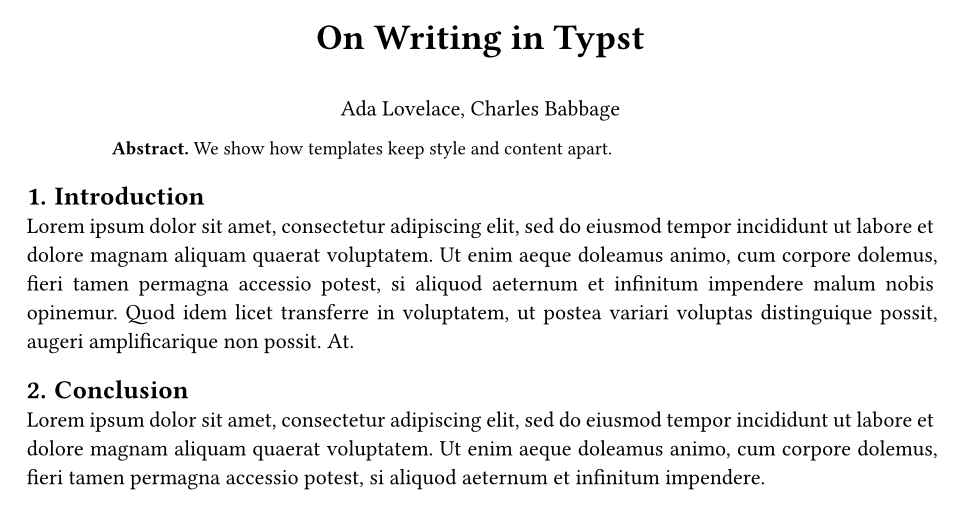
article.with(...) fills in the named arguments and leaves body for the show rule.
Using a template from another file
In a project, keep the template in its own file, such as template.typ, and import it in main.typ:
#import "template.typ": article

#show: article.with(title: [My Paper], authors: ("Ada Lovelace",))

= Introduction
Your text here.
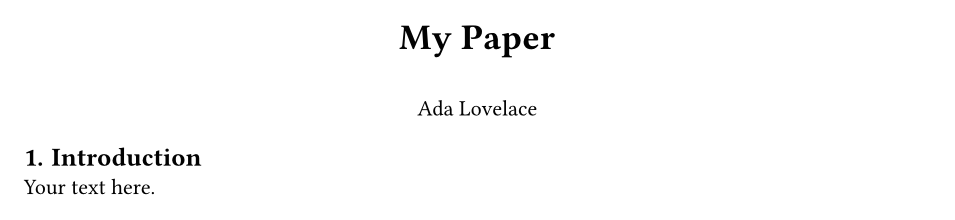
This keeps your writing short and lets everyone on a team share the same look. To share a template with everyone on your server, publish the project as a package. See Packages.
Starting from someone else's template
TypstDrive can create a document or project from any template on Typst Universe, with the authors filled in for you. See Templates. Open the template's main file to see how it uses set, show and #show: template.with(...), exactly as on this page.
A complete letter template
#let letter(sender: [], recipient: [], date: [], subject: [], body) = {
  set page(paper: "a4", margin: (x: 2.5cm, top: 2cm, bottom: 2.5cm))
  set text(size: 11pt)
  set par(justify: true, spacing: 1em)

  align(right, sender)
  v(1cm)
  recipient
  v(0.8cm)
  align(right, date)
  v(0.5cm)
  text(weight: "bold", subject)
  v(0.3cm)
  body
}

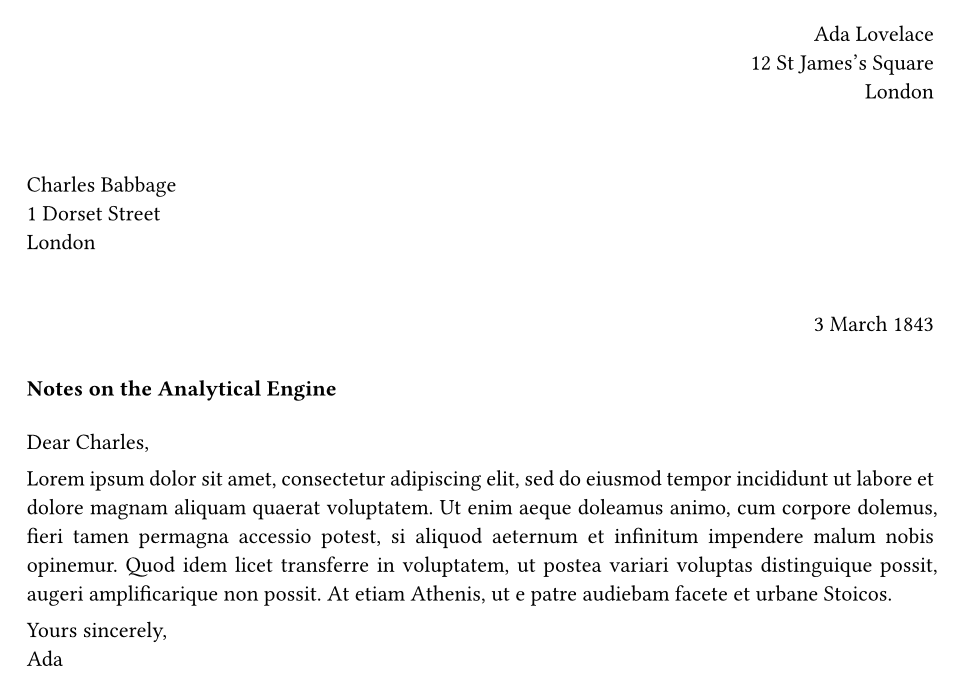
#show: letter.with(
  sender: [Ada Lovelace \ 12 St James's Square \ London],
  recipient: [Charles Babbage \ 1 Dorset Street \ London],
  date: [3 March 1843],
  subject: [Notes on the Analytical Engine],
)

Dear Charles,

#lorem(70)

Yours sincerely, \
Ada
Where to go from here
- The Typst reference lists every function and argument.
- Typst Universe has templates and packages to learn from.
- Typst for LaTeX users maps LaTeX habits to Typst.