Typst: math
Typst has math built in. You do not need any package, and the syntax is close to how you would read a formula aloud.
Inline and display math
Put math between dollar signs. Without spaces inside the dollars, the formula stays in the line of text. With a space after the opening dollar and before the closing one, it becomes a display formula on its own line, centred.
The area of a circle is $pi r^2$, where $r$ is the radius.

The solutions of $a x^2 + b x + c = 0$ are

$ x = (-b plus.minus sqrt(b^2 - 4 a c)) / (2 a) $

Letters, numbers and spaces
Single letters are variables and are set in italics. Words of two or more letters are looked up as symbols or functions, so write $a b$ (with a space) for a product of two variables. $ab$ is an error, because there is no symbol named ab.
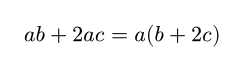
To write a word as text inside math, put it in quotes:
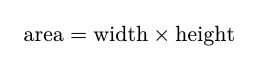
Superscripts, subscripts and fractions
| You type | Meaning |
|---|---|
x^2 |
superscript |
x_i |
subscript |
x_(i+1)^(2n) |
use parentheses for more than one character; they are not printed |
a/b |
a fraction |
(a+b)/(c+d) |
a fraction with longer parts; the outer parentheses disappear |
1/2 x |
a fraction followed by a variable |
sqrt(x) and root(3, x) |
square root and cube root |
binom(n, k) |
a binomial coefficient |
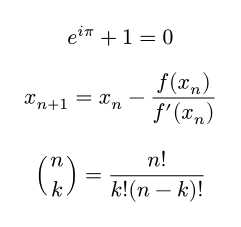
Greek letters and symbols
Greek letters are written by name: alpha, beta, gamma, delta, epsilon, theta, lambda, mu, pi, sigma, phi, omega. Capitalize the first letter for capitals: Gamma, Delta, Sigma, Omega.
Many symbols have short forms:
| You type | Symbol |
|---|---|
<=, >=, != |
less or equal, greater or equal, not equal |
->, =>, <->, |-> |
arrows |
approx, prop, equiv |
approximately, proportional, equivalent |
times, dot, div |
multiplication and division |
plus.minus |
plus or minus |
infinity or oo |
infinity |
in, in.not, subset, subset.eq, union, sect |
set symbols |
forall, exists, not |
logic |
RR, NN, ZZ, QQ, CC |
number sets |
dots, dots.c, dots.v |
ellipses |
partial, nabla |
derivatives |
Symbols can have variants joined with dots, for example arrow.r.double, lt.eq.slant or plus.circle. The editor suggests them as you type.
$ forall epsilon > 0 space exists delta > 0 : |x - a| < delta => |f(x) - f(a)| < epsilon $

$ A union B subset.eq C, quad x in RR, quad n in NN $
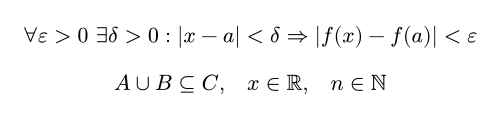
space, quad and wide add more and more horizontal space.
Sums, integrals and limits
Big operators take their limits as subscripts and superscripts. In display formulas they go above and below.
$ sum_(i=1)^n i = (n (n + 1)) / 2 $

$ integral_0^infinity e^(-x^2) dif x = sqrt(pi) / 2 $

$ lim_(x -> 0) (sin x) / x = 1 $

$ product_(k=1)^n k = n! $
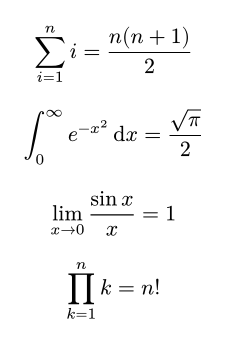
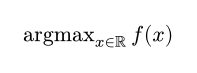
dif gives the upright "d" used in integrals. Known functions such as sin, cos, log, exp, max and lim are set upright automatically. For your own, use op:
Brackets that grow
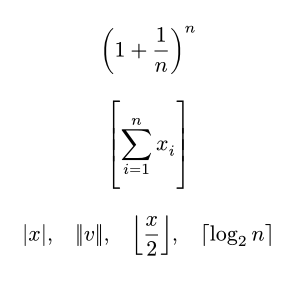
Parentheses, brackets and braces grow to fit what is inside them automatically. Use lr to control the size, and abs, norm, floor and ceil for common pairs.
$ (1 + 1/n)^n $

$ lr([ sum_(i=1)^n x_i ], size: #150%) $

$ abs(x), quad norm(v), quad floor(x / 2), quad ceil(log_2 n) $
Vectors, matrices and cases
Separate entries in a row with commas and rows with semicolons.
$ v = vec(1, 2, 3) $

$ A = mat(
  1, 2, 3;
  4, 5, 6;
  7, 8, 9;
) $

$ det mat(a, b; c, d) = a d - b c $

$ f(x) = cases(
  x^2 & "if" x >= 0,
  -x & "otherwise",
) $
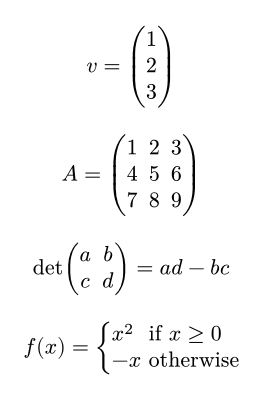
Change the brackets with delim: mat(delim: "[", 1, 0; 0, 1).
Accents and styles
| You type | Meaning |
|---|---|
hat(x), tilde(x), bar(x), dot(x), dot.double(x) |
accents |
arrow(v) |
a vector arrow |
overline(a + b), underline(x) |
lines over and under |
overbrace(a + b, "sum"), underbrace(x y, "product") |
braces with notes |
bold(x), upright(x), italic(x) |
text styles |
cal(A), frak(g), bb(R), mono(x) |
calligraphic, fraktur, blackboard and monospace letters |
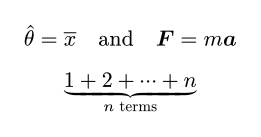
$ hat(theta) = overline(x) quad "and" quad bold(F) = m bold(a) $

$ underbrace(1 + 2 + dots.c + n, n "terms") $
Aligned equations on several lines
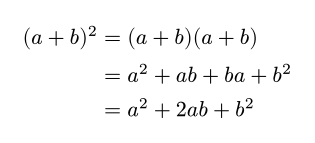
Use \ to break lines and & to mark where the lines should line up.
Numbered equations
Turn on numbering for display formulas, then label an equation and refer to it with @.
#set math.equation(numbering: "(1)")

The famous identity is

$ e^(i pi) + 1 = 0 $ <euler>

and @euler connects five fundamental constants.

Inline formulas are never numbered. See Images, tables and references for more about labels.
Code inside math
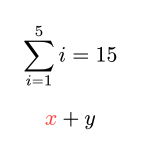
Inside math, # brings back code, which is useful for variables and colours.
Common mistakes
| Problem | Fix |
|---|---|
unknown variable: ab |
Put a space between single letters: a b. |
| A fraction takes too much | Wrap the parts in parentheses: (a+b)/c instead of a+b/c. |
| Text inside math has no spaces | Put words in quotes: "for all" x. |
| A subscript only covers one letter | Use parentheses: x_(i j) instead of x_ij. |
Next steps
Continue with Page layout and styling.