LaTeX: bibliographies
LaTeX keeps references in a separate .bib file and builds the reference list from the entries you cite. This guide covers the three common ways to do it and what works in TypstDrive.
The .bib file
Upload a file named, for example, refs.bib. Each entry has a type, a key you cite it by, and fields.
A file named refs.bib:
@book{knuth1984,
  author    = {Donald E. Knuth},
  title     = {The {\TeX}book},
  publisher = {Addison-Wesley},
  address   = {Reading, MA},
  year      = {1984},
}

@article{turing1936,
  author  = {Alan M. Turing},
  title   = {On Computable Numbers, with an Application to the {Entscheidungsproblem}},
  journal = {Proceedings of the London Mathematical Society},
  volume  = {42},
  pages   = {230--265},
  year    = {1936},
}

@misc{typst,
  author = {{Typst GmbH}},
  title  = {Typst},
  year   = {2026},
  url    = {https://typst.app},
}
- Common types are
@article,@book,@inproceedings,@incollection,@phdthesis,@techreportand@misc. - Separate several authors with
and:author = {Ada Lovelace and Charles Babbage}. - Braces around a word, like
{Entscheidungsproblem}, keep its capital letters. Double braces around an organisation name stop it being read as first and last name.
TypstDrive can fill the .bib file for you from DOIs, arXiv, PubMed and Semantic Scholar IDs, or keep it in sync with Zotero. See Citations.
Plain BibTeX
The classic way. Cite with \cite, then say where the list goes and in which style.
\documentclass{article}

\begin{document}
Typesetting has a long history~\cite{knuth1984}, and so does
computation~\cite{turing1936, typst}.

\bibliographystyle{plain}
\bibliography{refs}
\end{document}
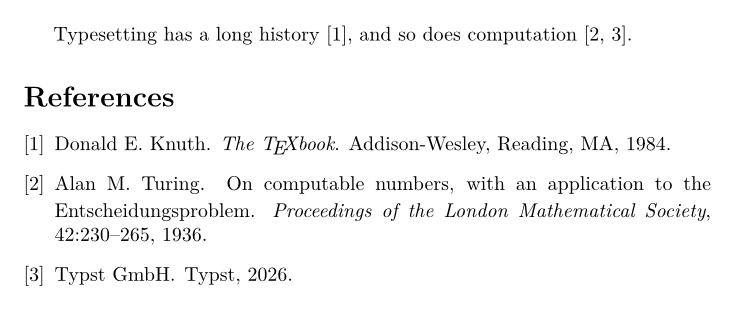
\bibliography{refs}names the file without.bib.- Styles that come with BibTeX:
plain(numbered, sorted),unsrt(numbered in citation order),alpha(labels like [Knu84]),abbrv, andieeetr. Journal classes often bring their own, such asIEEEtran. \cite[p.~7]{knuth1984}adds a page number.\nocite{*}lists every entry in the file, cited or not.
TypstDrive runs BibTeX and LaTeX as many times as needed, so citations and the list appear in one compile.
natbib: author-year citations
natbib adds citations written into the sentence, as used in the sciences and humanities.
\documentclass{article}
\usepackage[round]{natbib}

\begin{document}
\citet{knuth1984} describes \TeX\ in detail, and computability goes
back further \citep{turing1936}. See also \citep[chapter~2]{knuth1984}.

\bibliographystyle{plainnat}
\bibliography{refs}
\end{document}
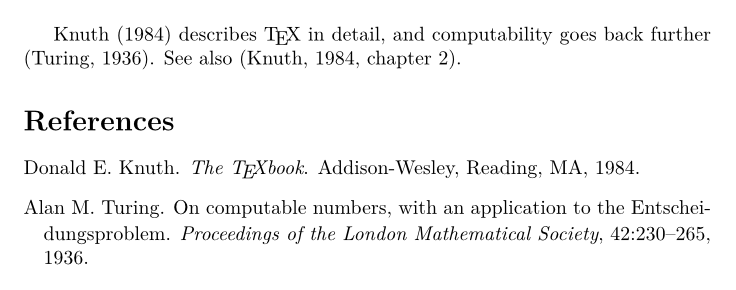
| Command | Result |
|---|---|
\citet{knuth1984} |
Knuth (1984) |
\citep{knuth1984} |
(Knuth, 1984) |
\citep[p.~7]{knuth1984} |
(Knuth, 1984, p. 7) |
\citeauthor{knuth1984} |
Knuth |
\citeyear{knuth1984} |
1984 |
Use plainnat, abbrvnat or unsrtnat as the style. Add the numbers option, \usepackage[numbers]{natbib}, for numbered citations with the same commands.
BibLaTeX
BibLaTeX is the modern system with many styles and full Unicode support. It normally runs a program called Biber, which TypstDrive does not have, so always add backend=bibtex.
\documentclass{article}
\usepackage[backend=bibtex, style=authoryear]{biblatex}
\addbibresource{refs.bib}

\begin{document}
\textcite{knuth1984} describes \TeX, and computability goes back
further \parencite{turing1936}.

\printbibliography
\end{document}
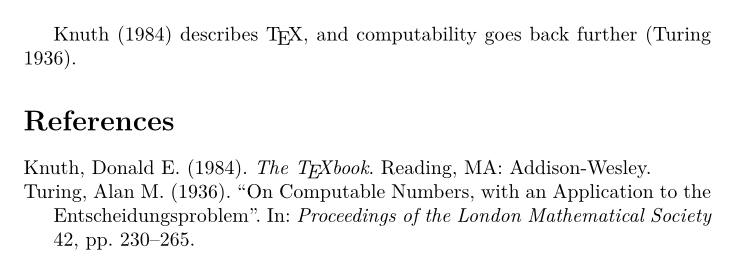
\addbibresource{refs.bib}takes the file name with.bib.- Styles include
numeric,alphabetic,authoryear,authortitle,ieeeandapa. \textciteand\parencitematch natbib's\citetand\citep.\cite,\footciteand\autocitealso exist.\printbibliography[title={References}]changes the heading.
Which one should I use?
| You need | Use |
|---|---|
| A journal or conference template | Whatever the template uses, usually plain BibTeX with its own style. |
| Author-year citations with few changes | natbib with plainnat. |
| Many styles, sorting and filtering options | BibLaTeX with backend=bibtex. |
A bibliography without a .bib file
For a handful of references, write the list by hand with thebibliography:
\documentclass{article}

\begin{document}
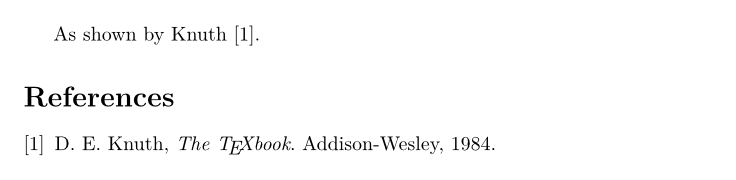
As shown by Knuth~\cite{knuth}.

\begin{thebibliography}{9}
\bibitem{knuth}
D.~E. Knuth, \emph{The \TeX book}. Addison-Wesley, 1984.
\end{thebibliography}
\end{document}
Troubleshooting
| Problem | Fix |
|---|---|
Citations show as [?] |
Check that the key in \cite matches the .bib file exactly, including case. |
| The list is empty | Check the file name in \bibliography{refs} (no .bib) or \addbibresource{refs.bib} (with .bib). |
| BibLaTeX error about Biber | Add backend=bibtex to the BibLaTeX options. |
| Capital letters become lowercase in titles | Put braces around them in the .bib file: {DNA}. |
Next steps
Write your own commands and drawings in Commands, packages and drawings.