Typst: scripting
Typst is also a small programming language. You can store values, write your own functions, repeat things in loops, make decisions and read data from files. This is what makes templates and data-driven documents possible.
Markup mode and code mode
A document starts in markup mode: what you type is text. A # switches to code mode for one expression, such as a function call or a variable.

Inside code, square brackets [...] go back to markup, and curly braces {...} hold several lines of code.
#let greeting = [Welcome, *#upper("reader")*!]
#greeting

#{
  let total = 2 + 3
  [The total is #total.]
}

Variables
#let gives a value a name. The name can be used anywhere after it.
#let project = "TypstDrive"
#let version = 2.2
#let release = [*#project #version*]

This document describes #release.

Types of values
| Type | Examples |
|---|---|
| Content | [Hello *world*] |
| String | "Hello", "line one\nline two" |
| Integer and float | 42, 3.14, 1e3 |
| Length | 2cm, 12pt, 1.5em |
| Ratio and fraction | 50%, 1fr |
| Boolean | true, false |
| None | none |
| Array | (1, 2, 3), ("a",) for a single item |
| Dictionary | (name: "Ada", born: 1815) |
| Colour | red, rgb("#1e66f5"), luma(50%) |
Operators work as you would expect: + - * /, comparisons == != < <= > >=, and and, or, not. + also joins strings and content, and * repeats them.

Functions
Write your own with #let name(arguments) = .... Named arguments get a default value.
#let note(body, colour: blue) = block(
  stroke: (left: 2pt + colour),
  inset: (left: 8pt, y: 4pt),
  body,
)

#note[This is a note.]
#note(colour: red)[This one is important.]

The last argument in brackets after the call is passed as the content: #note[...] is the same as #note([...]).
A function can contain several lines in curly braces. The last value is the result.
#let average(..numbers) = {
  let values = numbers.pos()
  values.sum() / values.len()
}

The average is #average(4, 8, 15, 16, 23, 42).

..numbers collects any number of arguments.
Conditions
#let score = 72

#if score >= 90 [
  Excellent!
] else if score >= 60 [
  Passed with #score points.
] else [
  Try again.
]

Loops
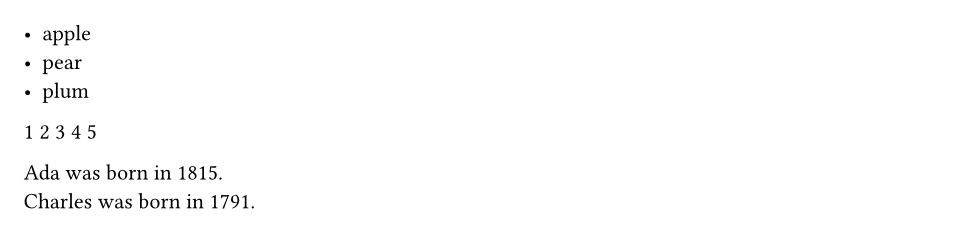
for goes through an array, a dictionary, a string or a range. while repeats while a condition holds.
#for fruit in ("apple", "pear", "plum") [
  - #fruit
]

#for i in range(1, 6) [#i ]

#let born = (Ada: 1815, Charles: 1791)
#for (name, year) in born [
  #name was born in #year. \
]
Arrays and dictionaries
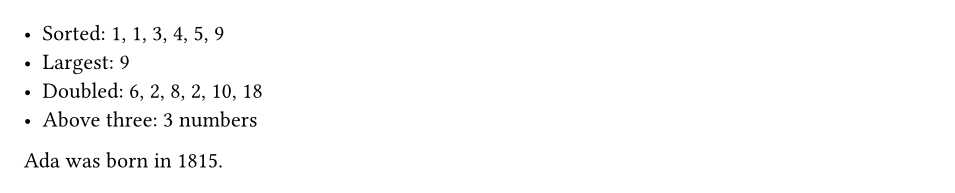
Arrays and dictionaries have methods, called with a dot.
#let numbers = (3, 1, 4, 1, 5, 9)
- Sorted: #numbers.sorted().map(str).join(", ")
- Largest: #calc.max(..numbers)
- Doubled: #numbers.map(n => n * 2).map(str).join(", ")
- Above three: #numbers.filter(n => n > 3).len() numbers

#let person = (name: "Ada", born: 1815)
#person.name was born in #person.at("born").
n => n * 2 is a short function without a name, useful with map and filter.
The calc module has maths functions: calc.round, calc.pow, calc.sqrt, calc.sin, calc.min, calc.max, calc.odd, calc.rem and more.
Reading data from files
Typst reads CSV, JSON, YAML, TOML and XML files. Upload the data file next to your document, then load it.
A file named data.csv:
The document:
#let rows = csv("data.csv")
#let header = rows.first()
#let body = rows.slice(1)

#table(
  columns: header.len(),
  table.header(..header.map(cell => strong(cell))),
  ..body.flatten(),
)

The best score is #calc.max(..body.map(row => int(row.at(1)))).
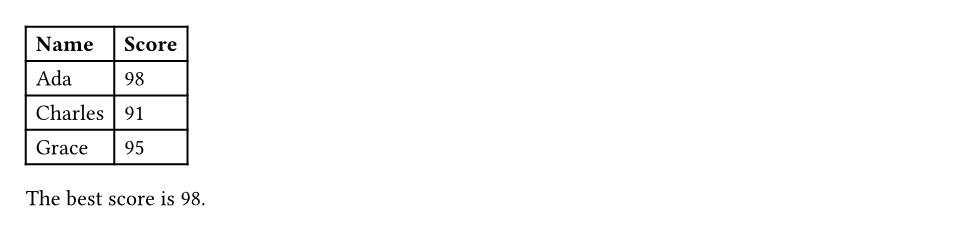
.. spreads an array into separate arguments, so ..body.flatten() passes every cell to the table.
A file named data.json:
{ "title": "Quarterly report", "items": [ { "name": "Pens", "count": 120 }, { "name": "Paper", "count": 40 } ] }

Counters and state
Typst keeps counters for pages, headings, figures and equations, and you can make your own. Reading a counter needs context, because the value depends on where on the page it is read.
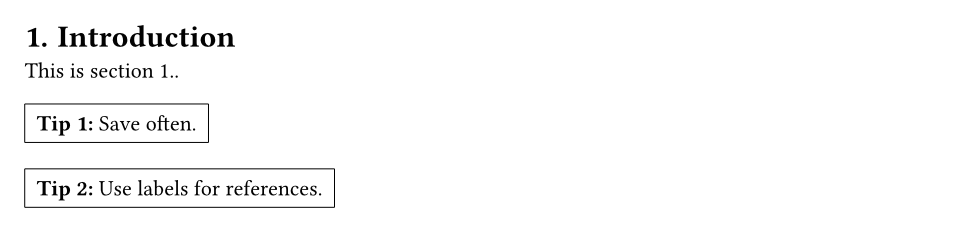
#set heading(numbering: "1.")

= Introduction
This is section #context counter(heading).display().

#let tip = counter("tip")
#let tip-box(body) = block(inset: 6pt, stroke: 0.5pt)[
  #tip.step()
  *Tip #context tip.display():* #body
]

#tip-box[Save often.]
#tip-box[Use labels for references.]
Splitting a document into files
In a project, keep chapters and helper functions in separate files.
#include "chapter.typ"places the content of another file here.#import "helpers.typ": note, averagemakes functions and variables from another file available.#import "helpers.typ": *imports everything.
For example, a project with three files:
helpers.typ:
chapters/intro.typ:
main.typ:

Packages
Packages from Typst Universe add diagrams, charts, slides and much more. Import them by name and version; TypstDrive downloads them the first time.
#import "@preview/cetz:0.3.4"

#cetz.canvas({
  import cetz.draw: *
  circle((0, 0), radius: 1)
  line((-1.5, 0), (1.5, 0), mark: (end: ">"))
  content((0, 1.4), [A circle])
})
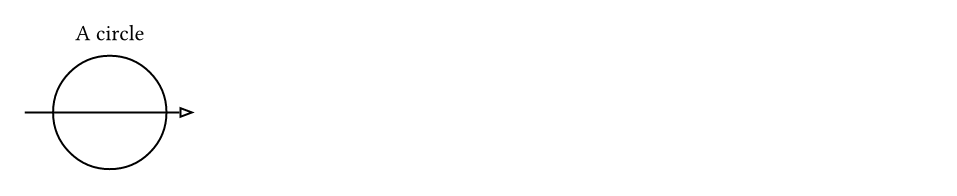
Packages your colleagues publish on your server are imported the same way. See Packages.
Next steps
Turn your styles into a template in Show rules and templates.