Typst: images, tables and references
This guide covers everything that is not plain text: pictures, tables, figures with captions, cross-references, footnotes and bibliographies.
Images
Upload the picture first: in a document, use Document files or Upload image in the toolbar; in a project, add it to the file tree. Then use its file name.

| Argument | What it does | Examples |
|---|---|---|
width |
Width, as a length or a share of the text width. | 8cm, 60% |
height |
Height. Give only one of width and height to keep the proportions. | 5cm |
fit |
What to do when both are given. | "cover", "contain", "stretch" |
alt |
A description for screen readers. | "A red bicycle" |
PNG, JPG, GIF, WebP, SVG and PDF files all work. In TypstDrive, typing /image opens a picker with every picture you can use.
Figures and captions
Wrap an image in #figure to give it a caption and a number. Add a label in angle brackets after it, so you can refer to it.
#figure(
  image("photo.jpg", width: 70%),
  caption: [The view from the observatory.],
) <observatory>

As @observatory shows, the sky was clear.
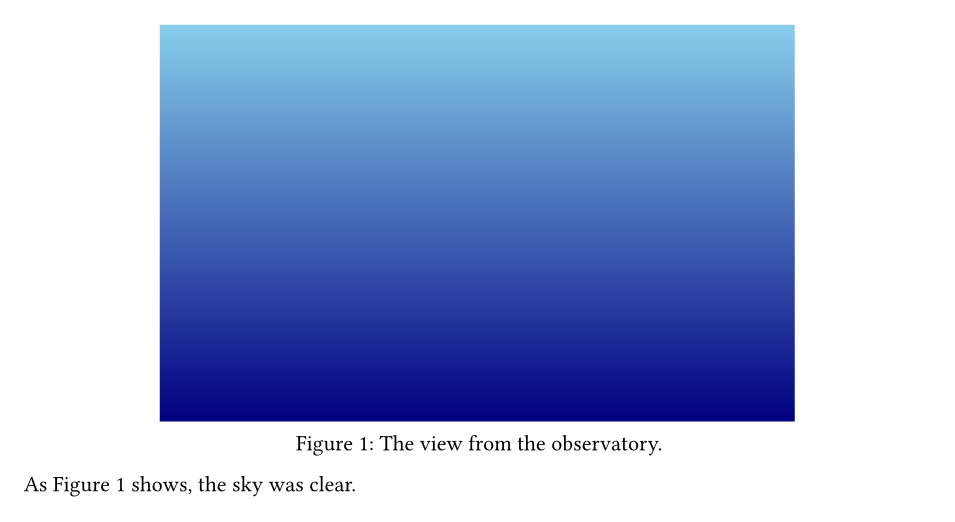
@observatory prints "Figure 1", with the right number, and becomes a link in the PDF. Labels can contain letters, digits, -, _, : and ., so names like <fig:observatory> are common.
Figures float freely by default. To let Typst move a figure to the top or bottom of a page, add placement: auto.
Tables
Give #table the number of columns, then list the cells row by row.
#table(
  columns: 3,
  [*Name*], [*Role*], [*Joined*],
  [Ada], [Editor], [2024],
  [Charles], [Viewer], [2025],
)

Columns can have their own widths: auto fits the content, a length is fixed, and fr shares the remaining space.
#table(
  columns: (auto, 1fr, 2cm),
  align: (left, left, right),
  inset: 8pt,
  stroke: 0.5pt + gray,
  table.header([*Item*], [*Description*], [*Price*]),
  [Pen], [Blue ink, fine tip], [\$2],
  [Notebook], [A5, dotted, 120 pages], [\$9],
)

table.headermarks the header row. It is repeated at the top of every page when a long table breaks.aligntakes one alignment for all cells, or one per column.stroke: noneremoves all lines.
A clean, book-style table
#table(
  columns: 3,
  stroke: none,
  align: (left, right, right),
  table.hline(),
  table.header([*Method*], [*Time (ms)*], [*Accuracy*]),
  table.hline(stroke: 0.5pt),
  [Baseline], [120], [81.2%],
  [Ours], [45], [88.9%],
  table.hline(),
)

Merged cells and colours
#table(
  columns: 3,
  fill: (x, y) => if y == 0 { rgb("#dde7ff") } else if calc.odd(y) { luma(245) },
  table.header([*Quarter*], [*Revenue*], [*Profit*]),
  [Q1], [100], [12],
  [Q2], [120], [18],
  table.cell(colspan: 2)[*Total*], [30],
)

fill can be a function of the column x and row y, which makes striped rows easy.
Tables in figures
Wrap a table in #figure for a caption. Typst numbers tables separately from images and calls them "Table".
#figure(
  table(
    columns: 2,
    [*Planet*], [*Moons*],
    [Earth], [1],
    [Mars], [2],
  ),
  caption: [Moons of the inner planets.],
) <moons>

@moons lists the moons.

Cross-references
Anything with a number can be labelled and referenced: headings, figures, tables and equations.
#set heading(numbering: "1.")
#set math.equation(numbering: "(1)")

= Introduction <intro>
We return to this in @results.

$ E = m c^2 $ <energy>

= Results <results>
As stated in @intro, @energy holds.
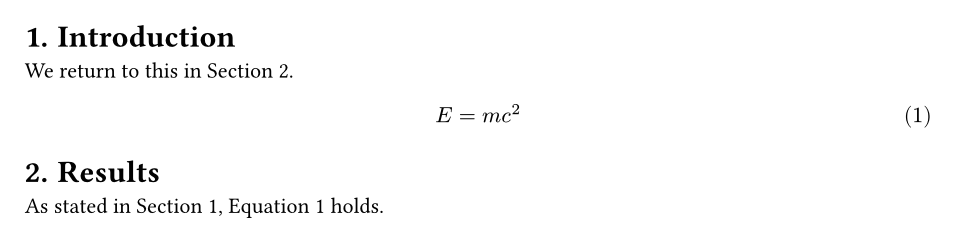
To change the word before the number, add it in brackets: @intro[Chapter]. For a reference without the word, use #ref(<intro>, supplement: none).
Footnotes
Typst was first released in 2023.#footnote[The first public beta.]
Footnotes are numbered automatically.#footnote[And placed at the bottom of the page.]

Bibliographies and citations
Upload a BibTeX file (.bib) or a Hayagriva file (.yml). Then cite entries by their key with @, and add #bibliography where the list should appear.
A file named refs.bib:
@book{knuth1984,
  author    = {Donald E. Knuth},
  title     = {The TeXbook},
  publisher = {Addison-Wesley},
  year      = {1984},
}

@article{turing1936,
  author  = {Alan M. Turing},
  title   = {On Computable Numbers, with an Application to the Entscheidungsproblem},
  journal = {Proceedings of the London Mathematical Society},
  year    = {1936},
  volume  = {42},
  pages   = {230--265},
}
The document:
Typesetting has a long history @knuth1984, and so does
computation @turing1936.

#cite(<turing1936>, form: "prose") showed that some problems
cannot be solved by any machine.

#bibliography("refs.bib", style: "ieee")
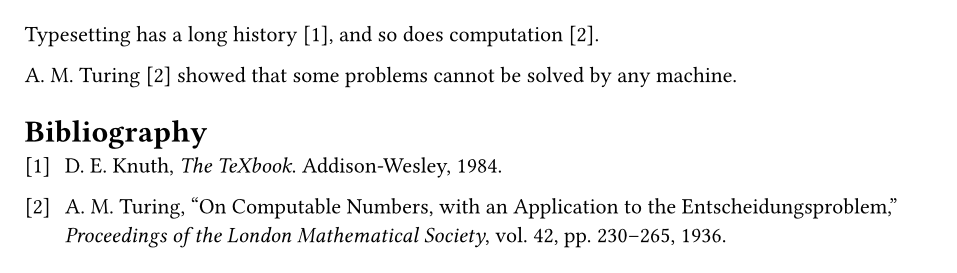
- Styles include
"ieee","apa","chicago-author-date","mla","nature"and many more. You can also upload a.cslfile and use its name. form: "prose"writes the author's name into the sentence.@knuth1984[p. 7]adds a page number to the citation.- Only cited entries appear in the list. Add
full: trueto#bibliographyto list everything.
TypstDrive can fill a .bib file for you from DOIs, arXiv IDs and Zotero. See Citations.
Next steps
Make the computer do the repetitive work in Scripting.