LaTeX: math
Mathematics is what LaTeX is famous for. Load amsmath in every document with formulas; it adds the environments used on this page.
amssymb adds extra symbols such as \mathbb{R}. In TypstDrive, inserting a command that needs amsmath from the toolbar adds it for you.
Inline and display math
$...$or\(...\)puts a formula inside the text.\[...\]puts it on its own line, centred and unnumbered.\begin{equation}...\end{equation}puts it on its own line with a number.
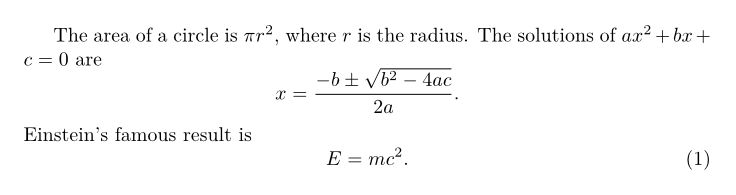
The area of a circle is $\pi r^2$, where $r$ is the radius.
The solutions of $ax^2 + bx + c = 0$ are
\[
  x = \frac{-b \pm \sqrt{b^2 - 4ac}}{2a}.
\]
Einstein's famous result is
\begin{equation}
  E = mc^2.
\end{equation}
Do not leave empty lines inside math; that is an error.
Superscripts, subscripts and fractions
| You type | Meaning |
|---|---|
x^2 |
superscript |
x_i |
subscript |
x_{i+1}^{2n} |
use braces for more than one character |
\frac{a}{b} |
a fraction |
\dfrac{a}{b}, \tfrac{a}{b} |
a full-size or small fraction |
\sqrt{x}, \sqrt[3]{x} |
square and cube root |
\binom{n}{k} |
binomial coefficient |
\[
  e^{i\pi} + 1 = 0, \qquad
  x_{n+1} = x_n - \frac{f(x_n)}{f'(x_n)}, \qquad
  \binom{n}{k} = \frac{n!}{k!\,(n-k)!}
\]

Greek letters and symbols
Greek letters: \alpha, \beta, \gamma, \delta, \epsilon, \varepsilon, \theta, \lambda, \mu, \pi, \sigma, \phi, \omega, and capitals \Gamma, \Delta, \Sigma, \Omega.
| Symbols | You type |
|---|---|
| ≤ ≥ ≠ ≈ ≡ | \leq \geq \neq \approx \equiv |
| × · ÷ ± | \times \cdot \div \pm |
| → ⇒ ↔ ↦ | \to \Rightarrow \leftrightarrow \mapsto |
| ∞ ∂ ∇ | \infty \partial \nabla |
| ∈ ∉ ⊂ ⊆ ∪ ∩ ∅ | \in \notin \subset \subseteq \cup \cap \emptyset |
| ∀ ∃ ¬ ∧ ∨ | \forall \exists \neg \land \lor |
| ℝ ℕ ℤ ℚ ℂ | \mathbb{R} \mathbb{N} \mathbb{Z} \mathbb{Q} \mathbb{C} |
| … ⋯ ⋮ ⋱ | \ldots \cdots \vdots \ddots |
Spacing in math is automatic. To add more, use \, (thin), \; (medium), \quad and \qquad.
Text and function names in math
Letters in math are italic variables, and spaces are ignored. Use \text for words and the built-in operators for function names:
\[
  \text{area} = \text{width} \times \text{height}, \qquad
  \sin^2 x + \cos^2 x = 1, \qquad
  \lim_{x \to 0} \frac{\sin x}{x} = 1
\]

Built-in names include \sin, \cos, \tan, \log, \ln, \exp, \max, \min, \lim, \det and \gcd. Define your own in the preamble with \DeclareMathOperator{\argmax}{arg\,max}.
Sums, integrals and products
\[
  \sum_{i=1}^{n} i = \frac{n(n+1)}{2}, \qquad
  \int_0^\infty e^{-x^2}\,dx = \frac{\sqrt{\pi}}{2}, \qquad
  \prod_{k=1}^{n} k = n!
\]

\, before dx adds the small space that is traditional in integrals. \iint and \oint give double and contour integrals.
Brackets that grow
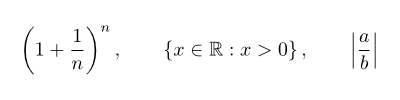
Plain brackets keep their size. Put \left and \right in front to make them grow with their content.
\[
  \left( 1 + \frac{1}{n} \right)^n, \qquad
  \left\{ x \in \mathbb{R} : x > 0 \right\}, \qquad
  \left| \frac{a}{b} \right|
\]
For a fixed size, use \big, \Big, \bigg and \Bigg before the bracket.
Matrices and cases
\[
  A = \begin{pmatrix}
    1 & 2 & 3 \\
    4 & 5 & 6 \\
    7 & 8 & 9
  \end{pmatrix}, \qquad
  \det \begin{vmatrix} a & b \\ c & d \end{vmatrix} = ad - bc
\]
\[
  f(x) = \begin{cases}
    x^2 & \text{if } x \geq 0, \\
    -x  & \text{otherwise.}
  \end{cases}
\]
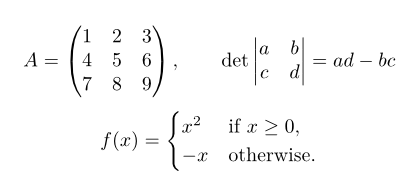
& separates columns and \\ ends a row. pmatrix uses parentheses, bmatrix square brackets, vmatrix vertical bars and matrix none.
Accents and styles
| You type | Meaning |
|---|---|
\hat{x}, \tilde{x}, \bar{x}, \dot{x}, \ddot{x} |
accents |
\vec{v}, \overrightarrow{AB} |
vector arrows |
\overline{a+b}, \underline{x} |
lines |
\overbrace{a+b}^{\text{sum}}, \underbrace{xy}_{\text{product}} |
braces with notes |
\mathbf{F}, \boldsymbol{\alpha} |
bold letters and bold Greek |
\mathrm{d}, \mathcal{A}, \mathfrak{g}, \mathbb{R} |
upright, calligraphic, fraktur, blackboard |
Several lines
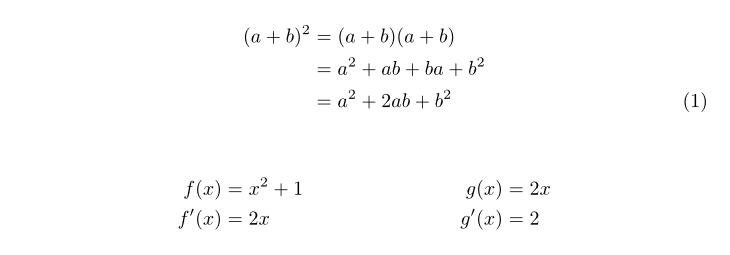
align lines up equations at & and numbers each line. align* does the same without numbers. \nonumber hides the number on one line.
\begin{align}
  (a+b)^2 &= (a+b)(a+b) \nonumber \\
          &= a^2 + ab + ba + b^2 \nonumber \\
          &= a^2 + 2ab + b^2
\end{align}

\begin{align*}
  f(x) &= x^2 + 1 & g(x) &= 2x \\
  f'(x) &= 2x     & g'(x) &= 2
\end{align*}
Other environments from amsmath:
gathercentres several equations without aligning them.multlinesplits one long equation over lines.aligned, inside\[...\]orequation, gives one number to a block of aligned lines.

Numbering and references
Label an equation and refer to it with \eqref, which adds the parentheses.
\begin{equation}
  e^{i\pi} + 1 = 0
  \label{eq:euler}
\end{equation}
Equation~\eqref{eq:euler} links five constants.

To number equations by section, add \numberwithin{equation}{section} to the preamble.
Theorems and proofs
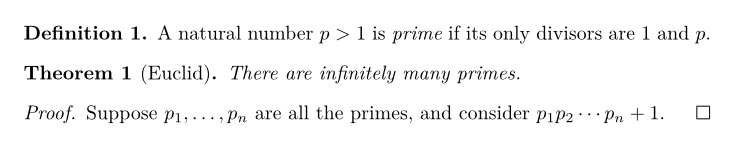
amsthm adds theorem-like environments. Declare them once in the preamble.
\documentclass{article}
\usepackage{amsmath,amssymb,amsthm}
\newtheorem{theorem}{Theorem}
\newtheorem{lemma}[theorem]{Lemma}
\theoremstyle{definition}
\newtheorem{definition}{Definition}

\begin{document}
\begin{definition}
A natural number $p > 1$ is \emph{prime} if its only divisors are $1$ and $p$.
\end{definition}

\begin{theorem}[Euclid]
There are infinitely many primes.
\end{theorem}

\begin{proof}
Suppose $p_1, \ldots, p_n$ are all the primes, and consider $p_1 p_2 \cdots p_n + 1$.
\end{proof}
\end{document}
Common mistakes
| Problem | Fix |
|---|---|
Missing $ inserted |
_ or ^ was used outside math. Wrap it in $...$ or escape it as \_. |
| A superscript only covers one character | Use braces: x^{10}, not x^10. |
| Words in math run together in italics | Use \text{...}. |
Undefined control sequence \text |
Load amsmath. |
Display math should end with $$ |
Use \[...\] instead of $$...$$. |
Next steps
Change paper, fonts and spacing in Page layout and fonts.