Typst: the basics
A Typst document is plain text. Most of it is just the words you want on the page, with a few marks for headings, emphasis and lists. This page covers everything you need to write a complete, well-structured document.
Paragraphs and line breaks
Type normally. A single line break inside a paragraph is ignored, so you can break long lines wherever you like. An empty line starts a new paragraph.
This is the first paragraph. It continues
on this line, and Typst joins the lines together.

This is a second paragraph.

To force a line break without starting a new paragraph, \
end the line with a backslash.

Headings
Start a line with = signs. One = is the biggest heading, and each extra = makes a smaller one.
= Introduction
Typst is a markup language for documents.

== Background
Some history.

=== A small detail
Headings can go as deep as you need.
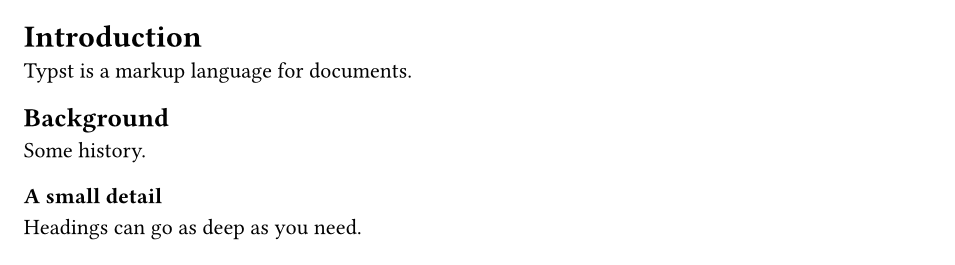
Headings are not numbered by default. Add #set heading(numbering: "1.") at the top to number them. See Page layout and styling.
Emphasis
| You type | You get |
|---|---|
*bold* |
bold |
_italic_ |
italic |
*_bold italic_* |
bold italic |
`code` |
code |
#underline[underlined] |
underlined |
#strike[crossed out] |
~~crossed out~~ |
#text(fill: red)[red text] |
red text |
#smallcaps[Small Caps] |
Small capitals |
H#sub[2]O and x#super[2] |
subscript and superscript in text |
Typst makes *important words* stand out and _titles of books_ slant.
You can *mix _both_ styles*, write `inline code`, and
#text(fill: blue, weight: "bold")[colour a phrase].

* and _ only work at the start and end of a word. To make part of a word bold, use the function form: un#strong[believ]able.
Lists
Use - for bullet points and + for numbered items. Indent with spaces to nest a list inside another.
- Fruit
  - Apples
  - Pears
- Vegetables

+ Preheat the oven.
+ Mix the ingredients.
  + Flour first.
  + Then eggs.
+ Bake for 30 minutes.
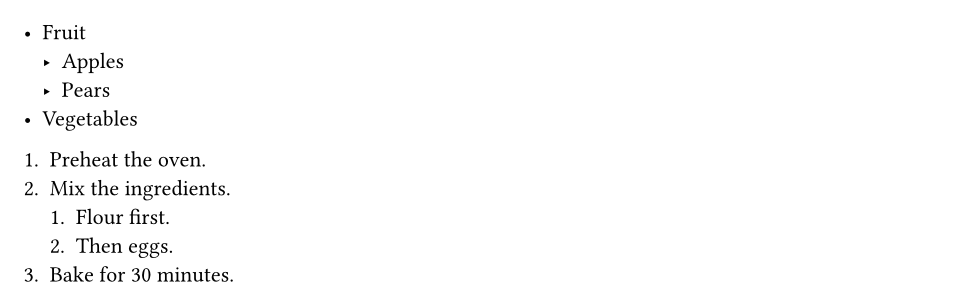
Numbered items count automatically. To start from another number, write the number yourself: 5. Fifth step.
A term list pairs a word with its explanation:
/ Compiler: A program that turns source text into a document.
/ Preview: The live view of your pages next to the editor.

Links
Web addresses become links on their own. Use #link for a link with different text.
Visit https://typst.app for the official documentation.

Read the #link("https://typst.app/docs/tutorial/")[Typst tutorial] next.

Write to #link("mailto:team@example.com")[the team].

Code and raw text
Backticks show text exactly as written, in a monospace font. Three backticks make a block, and a language name after them adds syntax colours.

Comments
Comments are notes for you. They never appear in the document.
// A comment runs to the end of the line.
This text is visible. // So is this, but not the comment.

/* A block comment
   can span several lines. */

In TypstDrive, press Ctrl+/ to turn the selected lines into comments and back.
Special characters
Some characters have a meaning in Typst: *, _, `, #, $, =, -, +, /, <, >, @ and \. Put a backslash in front to type them literally.
The price is \$20 and the discount is 10\%.
Use \#hashtags and \*stars\* freely.
Email me at someone\@example.com.

Typst also turns some character pairs into nicer symbols:
| You type | You get |
|---|---|
-- |
an en dash, as in 1990–2000 |
--- |
an em dash — like this |
... |
an ellipsis … |
"quotes" and 'quotes' |
curly quotes, matched to the text language |
~ |
a space that never breaks a line, as in Fig.~1 |
Functions
Everything beyond plain markup is a function, written with #, its name, and arguments in parentheses. Text that the function works on goes in square brackets.
#align(center)[This line is centred.]

#rect(width: 100%, fill: luma(235), inset: 10pt)[
  A grey box with some padding.
]

#lorem(30)
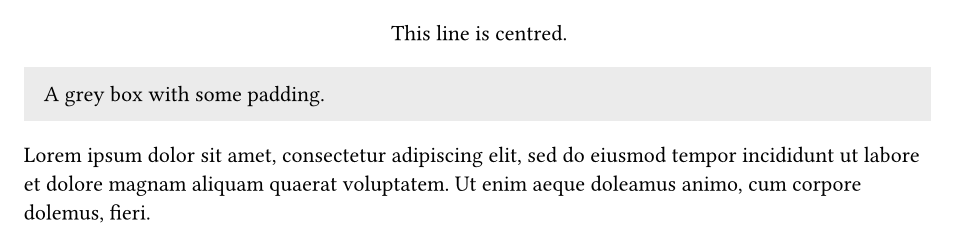
- Arguments in parentheses have a name and a value:
width: 100%. - Square brackets hold content: markup, just like the rest of your document.
#lorem(30)writes 30 words of placeholder text, handy for trying out layouts.
You will meet many more functions in the next guides: #set and #show rules to change styles, #image and #table for media, and #let to make your own.
A complete first document
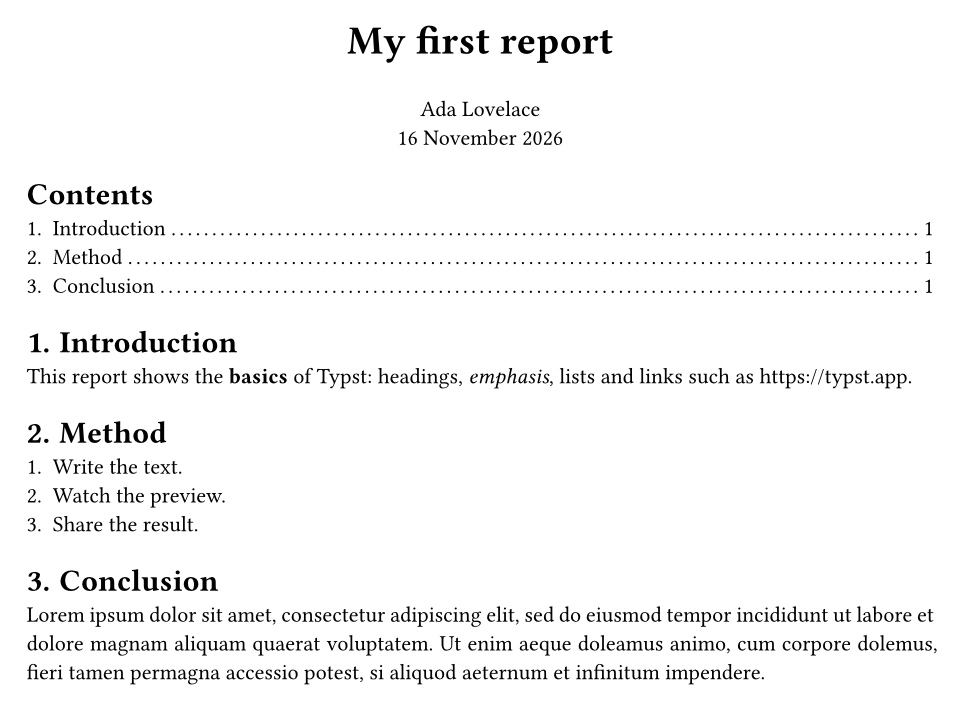
#set document(title: "My first report", author: "Ada Lovelace")
#set page(paper: "a4", margin: 2.5cm, numbering: "1")
#set text(size: 11pt)
#set par(justify: true)
#set heading(numbering: "1.")

#align(center)[
  #text(size: 20pt, weight: "bold")[My first report]

  Ada Lovelace \
  #datetime.today().display("[day] [month repr:long] [year]")
]

#outline()

= Introduction
This report shows the *basics* of Typst: headings, _emphasis_,
lists and links such as https://typst.app.

= Method
+ Write the text.
+ Watch the preview.
+ Share the result.

= Conclusion
#lorem(40)
Next steps
- Write formulas in Math.
- Change the look of the whole document in Page layout and styling.